Rain Global Surface Settings
Properties in this category allow you to customize scene rain surfaces globally, meaning changing any property here will affect the entire scene unless the object's materials use a property override.
Enable Coverage
Enables coverage in materials that use Weatherade shaders. If disabled, then the shaders will act like Unity Standard shader.
MASKS
Paintable
This option enables the ability to edit the procedurally generated coverage mask.
You can edit every aspect of the coverage mask, such as wetness, puddles, ripples and spots, drips. Vertex colors are used for regular MeshRenderers, and Terrains use an additional texture-mask. Both can be painted with Total Brush which is included in the package.
The following color channels are used for painting:
- R - Wetness
- G - Puddles
- B - Ripples and Spots
- A - Drips
Primary Masks
This primary masks texture used for the wet surface.
This texture requires the following channel mapping:
- R - puddles mask
- G - drips mask
- B - drips distortion noise.
Ripples
2DArray texture used for the ripples and spots animation.
This texture uses the following channel mapping:
- R G - ripple normals, used within puddles
- B - rain spots, used outside of puddles.
Stochastic Sampling
Enables stochastic sampling that helps eliminate visible tiling artifacts on ripples.
WETNESS
Color
A color multiplier used in coverage areas to simulate a wet effect.
Amount
Determines how wet the surface will be. Internally it multiplies the color of the base surface by the Color and adds gloss.
PUDDLES
Amount
Amount of puddles on the surface within the coverage area.
Color Multiplier
Puddles color multiplier. Use values lower than 1 to make the puddles look more deep.
Range
Puddles mask range. Adjust it to change the spread and sharpness of the puddles.
Tiling
Uniform tiling of the puddles mask.
Slope
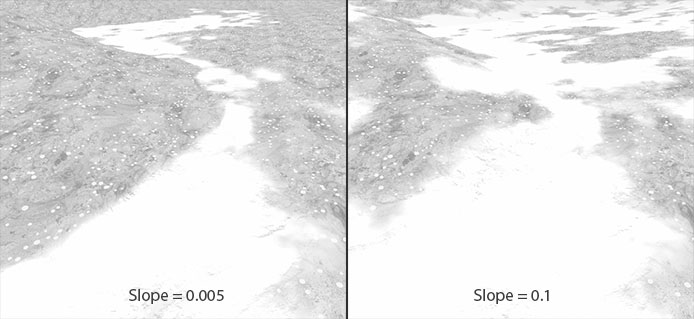
Maximum surface slope where puddles can appear. Use low values to avoid puddles on hillsides.
See how the puddle mask rises on the hillside when too high value used:
RIPPLES AND SPOTS
Enables ripples and spots effect on the surfaces. The ripples appear within the puddle mask, and spots appear outside of it.
Amount
Amount of ripples and spots.
Weatherade uses a technique, called Texture Bombing for this feature, so this value is a number of texture fetches.
Ripples Intenstiy
Intensity of the ripples effect on the puddles.
FPS
Speed of the ripples & spots playback in frames per second.
Tiling
Uniform tiling of the ripples & spots.
Spots Intensity
Intensity of rain spots appearing outside the puddle mask.
Spots Expansion
Intensity of spot expansion. Increase this value to get larger and denser rain spots.
DRIPS
Enables a flowing drips effect on vertical surfaces.
Drips Intensity
Intensity of the drips.
Speed
Speed of the drips.
Tiling
Tiling of the drips.
Distortion
Intensity of the drips distortion. Increase this value to get more curved drip paths.
Tiling
Tiling of the drips distortion noise. The higher the value, the more frequent the distortion will be.
AREA MASK
Area mask settings allow you to control how the coverage occlusion will look. All parameters here are related to each other.
Mask Range
Range of the coverage mask values. 1 = the most soft and wide transitions between the covered and base surface.
Bias
The bias of the coverage area.
This property is needed for two things:
- Fix the coverage banding and Z-clipping artifacts
- Shrink/expand the coverage occlusion mask in conjunction with the Mask Range.
Internally it works similar to the shadow bias property on the Unity light sources.
Leak Reduction
Reducing coverage leaks at the cost of increasing mask hardness.
Direction Offset
The linear offset from the original direction of the coverage instance. Values below 0 will create a stronger direction-dependent coverage mask, and values greater 0 can help add more coverage on the opposite side of the direction of the coverage instance. Internally it just adds this value to the coverage direction mask.
Direction Range
Shrink/expand the coverage direction mask gradient. You can make the direction mask more hard lowering the range.
BLEND BY NORMALS
Tweaking properties here can help make coverage transitions more organic.
Strength
Amount of base surface normal map influence on the coverage transitions blending. Consider this like the well-known height blending technique, but without the need to provide an additional height map, since Weatherade simulates this using a normal map.
Power
Power of the normal map blending. This uses a smoothstep function through the faked heightmap.
DISTANCE FADE
This feature allows you to eliminate the tiling artifacts on terrains by blending between original textures and LOD textures with lower tiling values.
Start Distance
The distance from camera at which the baked LOD texture starts to appear.
Falloff
The size of the fading gradient for the original/LOD texture. The higher the value, the softer the blend will be.