Trace Mask Generator
This additional component is required for the Traces feature to work. You should add it to the coverage instance game object by clicking the Add Now button or from the Add Component menu.
Internally, it renders the depth of Surfaces objects from the coverage instance's position and renders the depth of Tracer Objects from the opposite side (bottom to top). It then creates an initial mask using these depths and then modifies it to add a more realistic trace silhouette. After all this, it generates a normal map by sampling the mask 4 times with some offsets, and packs everything into a single RGBA texture.
Allow Edit in Playmode
Determines whether you can edit settings in play mode through the inspector UI. Useful for fine tuning the trace mask. Note: This does not take any effect in builds.
Resolution
The resolution of the generated traces mask texture. This resolution is relative to the coverage instance Horizontal Size. The traces will only be visible in the current coverage area. This is done for optimization purposes.
Mask Intensity
Trace mask intensity multiplier.
Blur Kernel Size
Amount of blur applied to the initial trace mask. Increasing this value can hit performance.
Normal Spread
The amount of sample offset when generating the trace normal map. Increasing this value can make the trace normal look wider.
Intersection Bias
The intersection offset between Trace Objects and Surfaces. Decreasing this value leads to earlier Tracer Objects and Surfaces contact, which results more agressive trace mask.
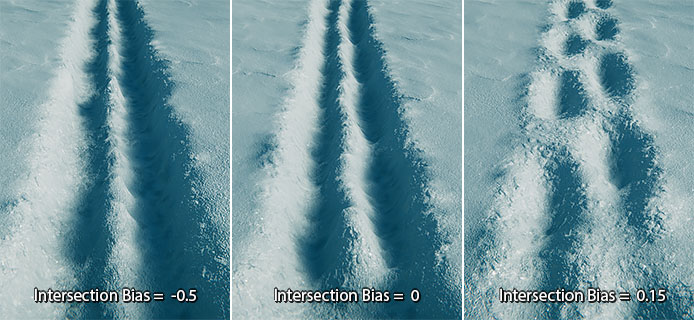
Depth
Depth of the trace. If set to 1, the snow within the trace will be pushed down to the surface of the ground. This value also depends on Intersection Bias and Mask Intensity.
Border Height
Height of the outline border around the trace. Can help make traces look more detailed and natural.
Noise
Adds noise to the trace mask. Can help make traces look more detailed and natural.
Tiling
Uniform tiling of the noise.
Area Falloff Hardness
The hardness of the mask that prevents from simply disappearance of traces at the border of the coverage volume. Works same as Area Falloff Hardness of the coverage instance.
Decay Speed
Defines, how fast the traces will dissapear. Useful for creating effects such as snowstorms, when the traces will be pretty quickly covered by snow. If set to 0, the traces will not disappear inside the coverage area.
Surfaces
The layer mask of the objects to be included in the process of generating the trace mask. The fewer objects included, the better performance will be.
Tracer Objects
The layer mask of objects, that will produce the traces. The fewer objects included, the better performance will be.