Baked Assets
After a successful bake, the output folder contains a small set of related assets. Names are prefixed by Character Name from the baker (clip assets use each clip’s state name).
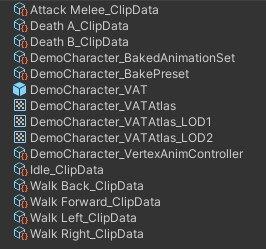
| File pattern | Type | Role |
|---|---|---|
{Character}_VATAtlas |
Texture2DArray |
Position atlas (+ normals slice when baked) |
{State}_ClipData |
BakedAnimationClipData |
One clip’s atlas layout, timing, events, attachments |
{Character}_BakedAnimationSet |
BakedAnimationSet |
Atlas + clip list + material + slot names + Has Normals |
{Character}_VertexAnimController |
VertexAnimController |
States, parameters, transitions, locomotion settings |
{Source}_VAT |
Prefab | Ready player (optional; Create VAT Prefab) |
{Character}_BakePreset |
VatBakePreset (ScriptableObject) |
Baker settings for the next bake. Inspector: Open Vertex Animator Baker |
VAT Atlas
Asset: {CharacterName}_VATAtlas (Texture2DArray)
Stores every baked pose for the character.
| Property | Meaning |
|---|---|
| Width | Vertex count of the source mesh |
| Height | Total atlas rows (all clips + padding) |
| Depth | 1 = positions only; 2 = positions + normals (Bake Vertex Normals) |
| Slice 0 | Positions (RGB) |
| Slice 1 | Object-space normals when depth is 2 |
| Format | RGBAHalf |
| Filter | Bilinear |
| Wrap | Clamp |
Clip Data
Asset: {StateName}_ClipData (BakedAnimationClipData) — one ScriptableObject per baked clip.
Holds everything the player needs about a single animation except the atlas pixels themselves.
State Name is a key used by the set lookup and by matching Vertex Anim Controller states. Must stay in sync with the controller state name.
Timing and playback
| Field | Meaning |
|---|---|
| Playback Speed | Multiplier vs source. 1 = original length; negative = reverse (same atlas rows). |
| Is Looping | Wrap playback; also changes how pad rows are authored for seamless loop seams. |
| Reference Move Speed | World units/sec this locomotion clip is authored for. Locomotion Driver scales anim rate by moveSpeed / referenceMoveSpeed. Ignored for Idle and one-shots. |
Events
List of VertexAnimEvent entries (seeded from the source AnimationClip on first bake, then editable in the Timeline):
| Field | Meaning |
|---|---|
| Time | Time in source clip space (0…duration), not wall-clock when playback speed ≠ 1 |
| Function Name | Handler name on VertexAnimEventReceiver |
| Parameters | Optional float / int / string / object, matching Unity animation event payload |
Debug (Read-only)
| Field | Meaning |
|---|---|
| Atlas Y Start | First content row of this clip in the atlas |
| Frame Count | Number of sampled content frames |
| Atlas Padding Rows | Extra rows around the clip for correct seamless playback |
| Sample Rate | FPS used when sampling into the atlas (quality / size). Not the playback clock by itself. |
| Native Frame Rate | Source-time frames/sec at bake (frameCount / duration when available). Playback at speed 1 tracks the source clip. |
| Duration | Source clip length in seconds (wall-clock length at Playback Speed = 1). |
Baked Animation Set
Asset: {CharacterName}_BakedAnimationSet (BakedAnimationSet)
The scriptable object the Vertex Anim Controller and Vertex Anim Player resolve clips from.
| Field | Meaning |
|---|---|
| Shared Material | Material that samples the VAT atlas (same reference the baker updated) |
| Position Atlas | The {Character}_VATAtlas Texture2DArray |
| Has Normals | Whether slice 1 exists; drives material _VAT_HasNormals |
| Atlas Height / Vertex Count | Cached dimensions (prefer reading from the atlas when present) |
| Clips | Ordered list of BakedAnimationClipData assets |
| Attachment Slot Names | Slot names available for runtime attachment meshes (from bake) |
| Lod Size | Object size for screen-height LOD tests. VAT LOD Group shows this as Object Size; the baker calls it LOD Size |
| Screen Percent (LOD0) | Screen height where LOD0 ends. 0 keeps the character on LOD0 until a later threshold |
| Update Interval (LOD0) | How many Tick calls pass between VAT pose updates on LOD0. 1 updates every call |
| Render Attachments (LOD0) | When off, LOD0 draws the body without attachment slots |
| LODs | Coarser levels after LOD0. Each entry has a mesh, its own atlas, screen percent, update interval, optional material, and render-attachments |
LOD screen percents match Unity’s Transition (% Screen Size). An empty LOD Material uses Shared Material. Atlas, texel size, normals, and the custom-data keyword are written onto every assigned LOD material; the blend keyword stays as authored on that material. See Runtime → VAT LOD Group.
Vertex Anim Controller
Asset: {CharacterName}_VertexAnimController (VertexAnimController)
Gameplay-facing state machine over the baked set. Created/updated when Fill Controller is enabled (merge-only for missing entries — see Baking).
Top-level
| Field | Meaning |
|---|---|
| Default State | State entered on play / when returning to locomotion with no movement (usually Idle) |
| Use Blend | Dual-clip shader blend (Idle↔Walk, directional blend, one-shot crossfades). Drives the CPU crossfade and the blend keyword on the shared LOD0 material. LOD materials keep the blend keyword you set on them. |
| Baked Animation Set | Link to {Character}_BakedAnimationSet |
| Locomotion | Tuning block for Vertex Anim Locomotion Driver (thresholds, damp times, blend durations, stickiness) |
| States | Idle / Locomotion / OneShot / Loop definitions |
| Parameters | Trigger names (runtime compares Animator.StringToHash) |
| Transitions | Usually Any-State → OneShot/Loop on matching trigger names |
States
| Field | Meaning |
|---|---|
| Name | Must match a clip State Name in the set |
| Type | Idle, Locomotion, OneShot, or Loop |
| Direction | For Locomotion only: Forward / Back / Left / Right |
Parameters
| Field | Meaning |
|---|---|
| Name | Used by SetTrigger method (string or hashed id) |
Transitions
| Field | Meaning |
|---|---|
| Any State | If on, can fire from any current state |
| From State / To State | Source and target state names |
| Trigger Name | Parameter that fires this transition |
| Blend Duration | Crossfade into the target (requires Use Blend) |
| Return To Locomotion | After a OneShot ends, return to idle/locomotion instead of holding the last frame. Ignored for Loop. |
Locomotion settings
| Field | Meaning |
|---|---|
| Min Speed Threshold | At or below → Idle |
| Min / Max Anim Speed | Clamps for moveSpeed / referenceMoveSpeed |
| Direction Damp Time | Smoothing of local forward/right blend axes |
| Locomotion Blend Duration | Idle↔Walk and return-from-one-shot crossfade |
| Blend Damp Time | How quickly directional blend / motion scale follow while moving |
| Primary Stickiness | Margin before another directional clip can become primary |
VAT Prefab (optional bake output)
When Create VAT Prefab is enabled in the baker (default), the first bake also writes {SourceName}_VAT.prefab:
- MeshFilter / MeshRenderer — original Source
SkinnedMeshRenderer.sharedMeshand the Shared Material - VertexAnimPlayer — controller + mesh refs, Play On Awake
- VertexAnimLocomotionDriver — wired to the player
- VAT LOD Group — inspector for the set’s LOD thresholds (the component itself stores no data)
If the prefab already exists, rebakes leave it alone — customize freely. See Get Started.
Shared Material
Not a new file from the baker, but part of the bake result. On success the baker typically:
- Assigns the VAT atlas to
_VAT_Tex(and_VAT_TexA/_VAT_TexBwhen present) - Sets texel size from vertex count
- Sets
_VAT_HasNormalsfrom Bake Vertex Normals /BakedAnimationSet.hasNormals - Enables GPU Instancing
- Applies the blend keyword on the shared material
The same atlas, texel size, normals flag, and custom-data keyword are written to each LOD material you assign. Blend and other authored shader settings on those materials are left alone.
Use a VAT-compatible shader. Crowds need instancing left enabled — see Instanced Rendering.
What to edit vs rebake
| Safe to edit after bake | Requires rebake |
|---|---|
| Clip Playback Speed, Looping, Reference Move Speed, Events (kept on rebake) | Mesh topology / vertex count change |
| LOD screen percents, object size, update interval, render attachments, LOD material | A different LOD mesh (needs a new atlas) |
| Controller states, parameters, transitions, locomotion tuning | Different clips, sample rates, or attachment slots |
| Material surface properties (color, maps) unrelated to atlas links | Atlas contents themselves |