Instanced Rendering
InstancedRenderSystem batches VAT characters and draws them with Graphics.RenderMeshInstanced. A player registers itself when its component is enabled. Attachment meshes register as extra instances in the same gather. See Runtime → Attachments.
Setup
- Place a GameObject with the Instanced Render System component in the scene, or call
InstancedRenderSystem.Instance(creates one if needed).
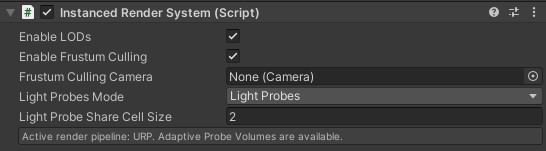
- Spawn prefabs that have VertexAnimPlayer. They register on enable.
using NOT_Lonely.VertexAnimator.Runtime;
using UnityEngine;

InstancedSpawnUtility.EnsureRenderSystem();

var enemy = InstancedSpawnUtility.Spawn(enemyPrefab, position, rotation);
InstancedSpawnUtility.Despawn(enemy);
LateTick
LateTick culls, fills instance buffers, draws batches, and retires unused feature textures. Call it once per frame, after every VertexAnimPlayer.Tick.
With Manual Update off, LateUpdate calls LateTick automatically. With Manual Update enabled do:
InstancedRenderSystem.Instance.LateTick();Frustum culling
Turn Frustum Culling on and assign a camera (or let the system resolve one). Each player has a culling sphere; the inspector can override the center and radius or take them from the mesh.
Enable LODs
Enable LODs defaults to on. Turn it off to skip distance LOD: every instance keeps the LOD0 mesh and material, updates every tick, and still draws attachments. The VAT LOD Group bar is unchanged. See Runtime → VAT LOD Group.
Batching
Instances batch by mesh and material. A coarser LOD mesh, or a LOD with its own material, is a separate batch. Sharing one mesh and one material across the crowd keeps the draw count down.
Light probes
| Mode | URP | HDRP |
|---|---|---|
| None | yes | yes |
| Light Probes | yes | yes |
| Adaptive Probe Volume | yes | hidden; a baked Probe Volume is still used by HDRP |
Adaptive Probe Volume is the URP option. On HDRP that choice falls back to Light Probes.
A baked HDRP Probe Volume still lights the instances in Light Probes mode, and that mode also samples classic probe groups on the CPU. If a Probe Volume is baked, set the mode to None.
Cell sharing applies to classic Light Probes. The active pipeline is shown under Edit → Project Settings → VAT Settings.
Prewarm
Prewarm allocates batch capacity and can issue an off-camera draw so the instancing shader compiles before a large spawn, which matters on platforms such as WebGL.
using NOT_Lonely.VertexAnimator.Runtime;
using UnityEngine;
using UnityEngine.Rendering;

void PrewarmCrowd(Mesh mesh, Material material, int expectedCount)
{
    InstancedRenderSystem.Instance.Prewarm(
        mesh,
        material,
        slotCount: expectedCount,
        drawDummy: true,
        shadowCastingMode: ShadowCastingMode.On,
        receiveShadows: true,
        layer: 0);
}
Call it during a loading screen, with the same mesh and material the crowd will use.
Custom renderables
Players register themselves. A custom IInstancedRenderable can register directly:
var system = InstancedRenderSystem.Instance;
system.Register(myRenderable);
system.Unregister(myRenderable);| Interface | Purpose |
|---|---|
IInstancedRenderable |
Mesh, material, matrix, shadows, layer, culling sphere |
IInstancedUintFeatureSource |
Packed VAT time and blend for the instance |
Optional custom-data channels pack extra per-instance bytes. See Runtime.